Interior design concepts are now being conceptualized and displayed freshly through the use of AI-powered design tools. Designers and creators need to render the spatial ideas to be true. The correct visualization will minimize errors in planning and help explain to clients. These systems can generate realistic interiors in seconds, with just a few words today. Pippit’s AI features enhance the concept development and iteration process. This approach can prove to be a great way to create detailed, presentation-ready, inside visuals efficiently.
Understanding AI Strength in Interior Design Visualization
AI models greatly enhance the conceptualization and rendering of interior spaces. Spatial relationships, furniture scale, and depth are all interpreted with great accuracy in the advanced systems. These features enable realistic room layouts, even if you don’t have the time or expertise for manual drafting and modeling. One such improvement is from Seedream, which enhances spatial awareness and composition control. It improves the precision of the positioning of objects and provides regular interior spaces. This helps to level out spaces, quite literally, and to create good reality and architectural continuity. Designers receive rapid ideation and accurate visual communication of a range of interior styles.

Core Elements That Make Interior Concepts Look Realistic
Several design principles must be taken into account when considering interior visualization, and AI should correctly reproduce these. Lighting consistency is the guarantee that shadows and highlights are the same as those of natural or artificial light. Material authenticity results in believable materials like wood grains, fabrics, stone textures, and so on. Color coordination makes things harmonious among the furniture, walls, and décor. The architectural accuracy results in the correct size of the ceilings, doors, and construction elements. Furniture is sensibly organized in the available space using natural relationships of objects. Seedance is a system that improves the scene coherence, the environment, and the realism of the interactions between objects in the generated interiors, so that they look like natural scenes and are visually stable.

Creating Effective Interior Design Prompts With AI Models
Structured and descriptive prompting is crucial to ensure high-quality interior results to guide AI interpretation. The first thing you need to do is decide what you are going to use the room for, be it a bedroom, an office, or a living room. Indicate style – modern, minimalist, classic, etc. Add description of materials such as marble floors, wooden panels, or fabric upholstery. Discuss their preferences for furniture, such as the kind of sofa they prefer, the designs of tables, shelving, etc. Add lighting: warm sun, ambient light, or spot light effects. Define the mood by using the words cozy, luxurious, or futuristic. Clear and structured prompts are used to help achieve precise and visually appealing interior compositions to achieve intended designs.
Steps to Generate Realistic Interior Design Concepts Through Seedream Models
Step 1: Enter the AI interior design creator
- At the main interface, click on the “Image studio” button to access the AI image generation workspace.
- Next, select the “AI design” feature to begin creating interior design concepts.
- The AI-powered models, including Seedream 4.0, Seedream 4.5, Seedream 5.0 lite, as well as GPT Image 2, are already integrated for image creation in this editor.

Step 2: Generate your interior concept
- Type in your prompt to describe the room or interior space you want to create.
- Include details such as furniture style, color palette, lighting, materials, layout, and decorative elements.
- Pick your preferred resolution and aspect ratio for the generated image.
- When everything is ready, click on the “Generate” button.

Step 3: Enhance designs and save results
- Preview all AI-powered photos that Pippit has created for you.
- Select the interior concept that best matches your vision.
- Feel free to use AI-powered editing tools, such as “Regenerate” and “Upscale image”.
- You can also choose the “Convert to video” feature for diverse types of content formats.
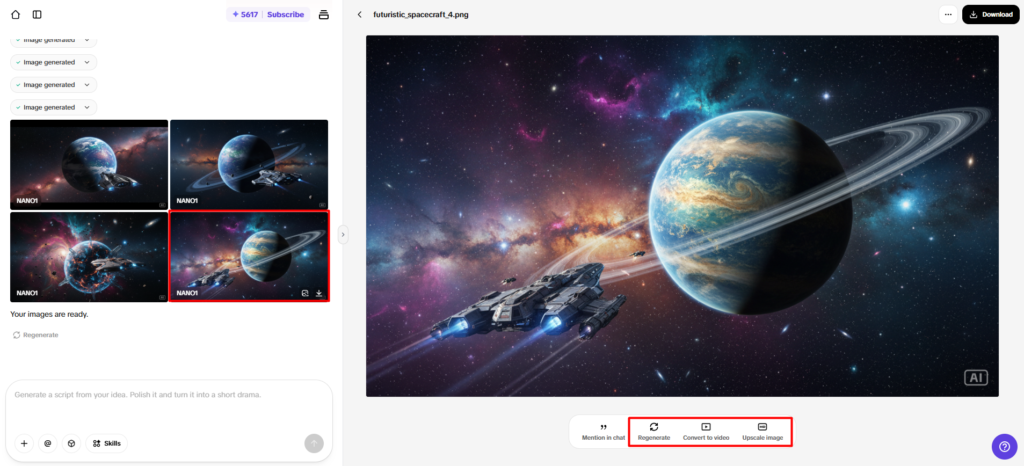
- Finally, click on the “Download” button to save your design.

Interior Design Components AI Handles Effectively
AI systems manage multiple interior design components to create realistic and functional environments.
- Furniture Arrangement
Creates room layouts that are in good proportion with good spatial relationships.
- Material Visualization
Produces realistic textures of wood, metal, fabric, and stone.
- Lighting Design
Describes light sources (both natural and artificial) and creates uniform shadows.
- Color Coordination
Produces attractive color combinations; adds to the unity of the visual.
- Decorative Features
Uses plants, art, and accessories to be realistic.
- Architectural Details
Correctly represents structures, including walls, ceilings, and openings.
All these components ensure the creation of interior concepts in a unified manner and with a professional approach for different types of designs and applications.
Refining Interior Concepts Using AI Editing Tools
AI-powered editing tools can be used to make interior ideas even better. It’s possible to make furniture layout changes to improve spatial balance. With point enhancement, important design features are emphasized. Texture upscaling makes the material, like wood surface and fabric, clearer. Efficiently explore multiple design iterations to explore other creative directions. Final polishing makes presentation-ready visuals that can be used professionally. These editing functions are integrated into Pippit’s streamlined workflow, enabling precise adjustments with ease, even without the need for complex software. It’s a method to continually enhance interior visuals for the best possible design quality.
Benefits of AI-Powered Interior Design Ideation
AI-driven interior design greatly enhances creative productivity and the accuracy of the visualization. The faster the concept is developed, the less time is spent drafting and modeling manually. More creative freedom gives the opportunity to try out several design approaches in a short time. Complex concepts are easier to explain, and visualization is simplified, making for an easier communication of concepts for an interior. Increased design flexibility allows for rapid prototyping of layouts and designs. Efficiency in the creation of your presentations translates to better communication and approval with your clients. These benefits render AI-powered tools indispensable in today’s fast-paced, high-quality, and flexible interior design process.
Conclusion
The use of AI technologies has changed the way interior design concepts are generated and presented. Through realistic rendering, communication, planning accuracy, and creative exploration are improved. This is where advanced modeling systems help, making it easier to understand spatial relationships and represent materials. Pippit allows you to use all the powerful tools in an easy-to-access manner, streamlining the generation and refining processes. This is linked to the ability to use efficient and high-quality interior visualization processes. Looking ahead, AI’s design impact is poised to endure in the future of creative practice in the field of interior planning and presentation.